So I thought—why not just show the map directly on YouTube?
The Core Idea
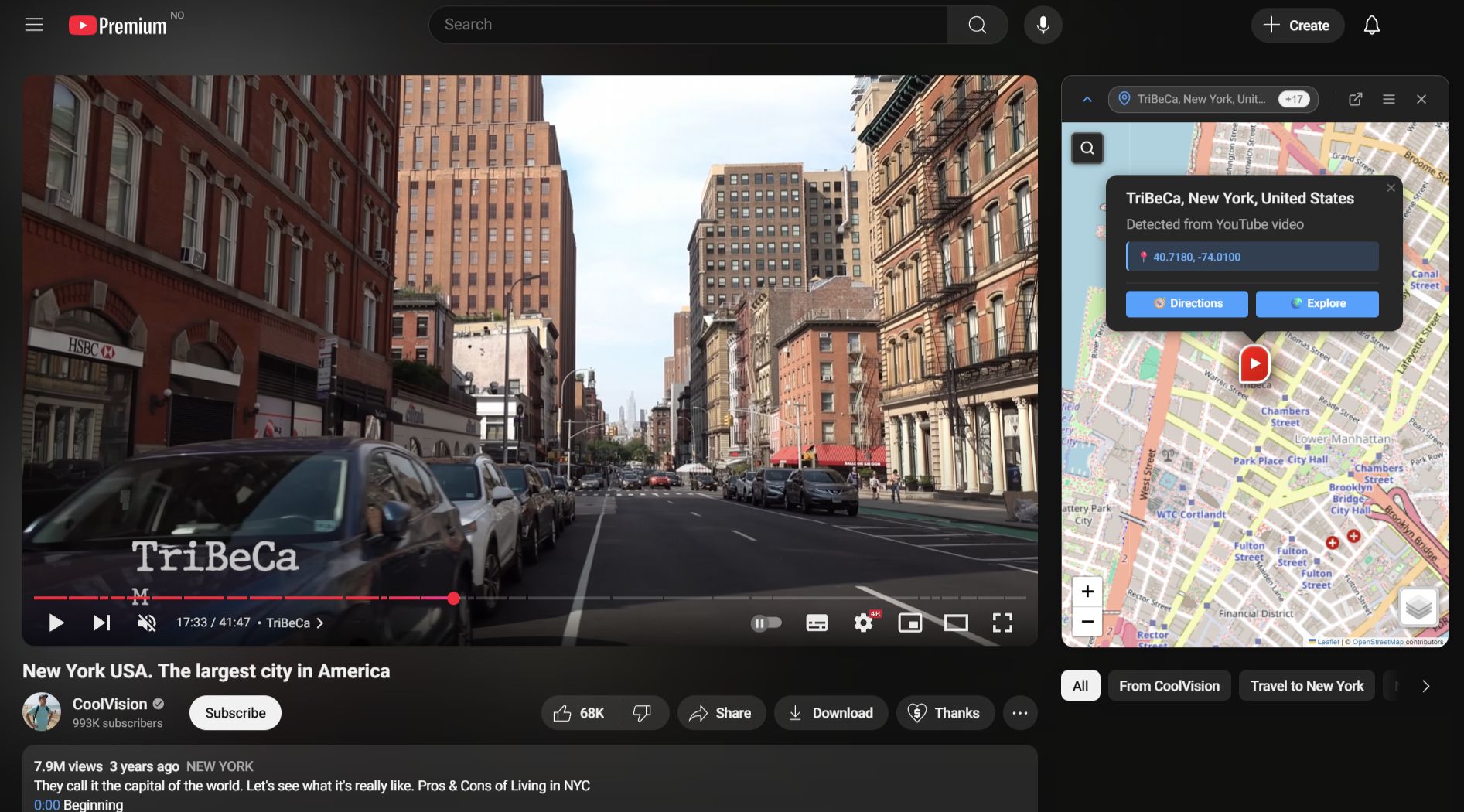
Toobmap puts an interactive map beside YouTube videos so you can follow the journey in real time. It comes in two forms: a browser extension that lives inside YouTube, and a standalone web app for a more immersive experience.
Both analyze public video metadata and captions to pull out locations and plot them on a map. The extension is built with Svelte 5 and injects into YouTube’s sidebar. The web app is a Next.js application. They share a monorepo: same types, same location-parsing logic, same geocoding pipeline.
Why It Was Harder Than Expected
At first, identifying places from a video seemed straightforward. Pull text from the title and description, find place names, plot them. Turns out, not even close.
The noise problem. Video descriptions are full of irrelevant text. A creator might write “check out my other series: Exploring Mumbai, India” in the description of a video shot entirely in Norway. For a human that’s obvious. For an algorithm, it’s a nightmare.
The ambiguity problem. “Georgia”—the country or the US state? “York”—standalone, or a truncated mention? I built a rule-based system: emoji flag hints, regional hierarchy scoring, geographic co-occurrence. If a video mentions Norway, Vestland, and Bergen together, it’s probably Bergen in Norway. It worked—until it didn’t. Every new edge case needed another heuristic. The whole thing got brittle fast. But I feel there is potential; a more sophisticated algorithm with a large database could learn to contextualize regions better.
Where AI Actually Helped
The breakthrough was bringing in a language model. The pipeline has a fast path and a slow path running in parallel. If YouTube has GPS coordinates or a location tag in the video metadata, those get rendered immediately. Meanwhile the AI call goes out in the background and refines the result.
The AI gets the video title, description, tags, recording details from the public metadata of the video. It returns an ordered list of locations with a parent chain (like Norway, Vestland, Bergen), a narrative order, and confidence-weighted coordinates. It is explicitly instructed to ignore promotional text and focus on what the video is actually about, which it does very well, a key distinction from other location detection systems.
Real-Time Narrative Sync
When captions are available, Toobmap detects when a location is mentioned and highlights it on the map as the video plays. This has a few layers. Best case: the AI already knows roughly when each location appears. Next best: scan the caption transcript for location name mentions and group them into time windows. If neither works, fall back to YouTube’s chapter markers. Last resort: slice the video duration equally across all detected locations.
Transcript availability is inconsistent though. A lot of videos have no captions at all, and if nothing’s there, the sync feature just doesn’t work.
Where It’s At
Still lots of work to be done prior to release of beta. Edge cases exist, optimizations are pending. But it works—genuinely changing how travel videos feel to watch. AI quality is good on well-described videos and unreliable on sparse ones, which is about what you’d expect. If you care about geographic context while watching travel videos, I hope this is something you’d get value out of using.